When should a client file be created?
A client file should be created once someone becomes a client, meaning they have instructed us to provide a service, have paid, and provided the required information to move forward with drafting.
Who creates the file?
While the will drafting team usually creates the client file, any member of staff can do so when needed.
Step-by-step process
1. Navigate to ELM\ESS LEGAL MGT\CLIENTS\YEARS\ on the company drive.
2. Run the "Create Client File" script

The company drive must be assigned to R:\ or the script will fail.

3. Follow the instructions provided in the script. First, enter the client's family name and hit enter.
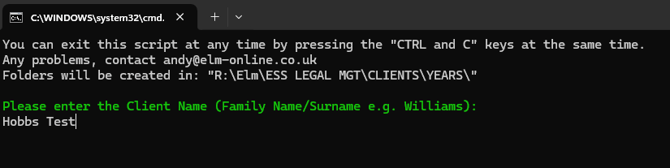
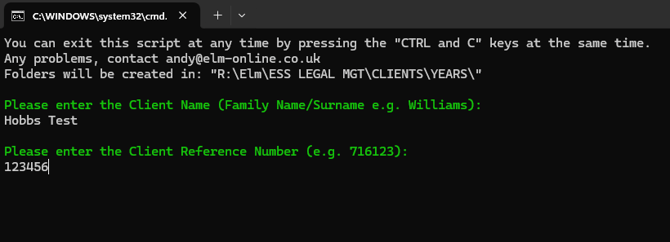
4. Enter their client reference number.
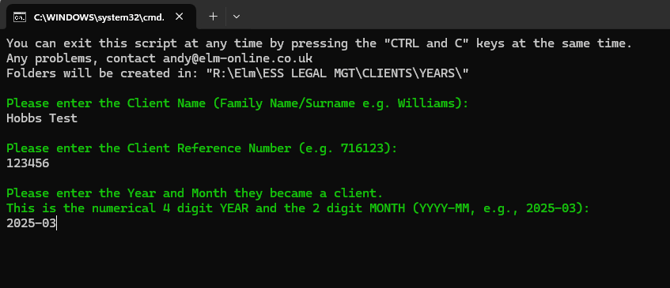
5. Enter the year and month they became a client.
6. The script will then prompt you to double-check the information you have provided.
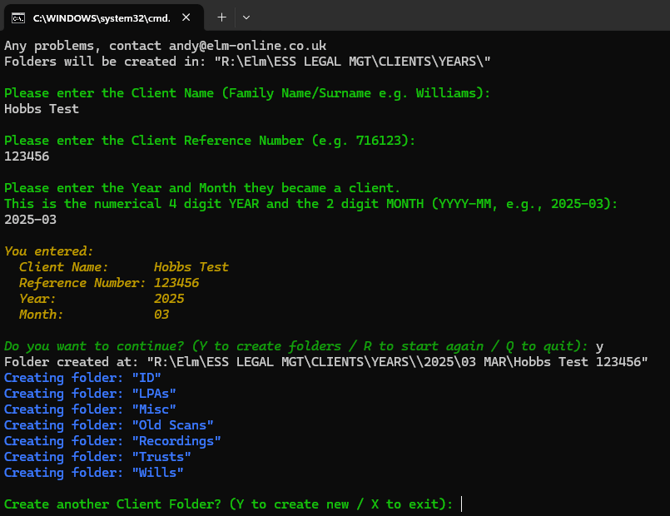
At this stage, you can enter Y to create another file or X to exit.
7. Once created, you will be able to find the client file in the correct year and month.

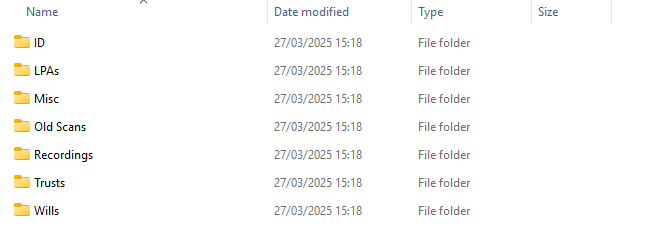
8. Inside, there will be a pre-defined file structure ready to use.